XAUUSD trading journal spreadsheet (free Excel and CSV)
Log every gold trade in R. Risk, R multiple and running P&L calculate themselves, and a summary sheet tracks win rate, expectancy, profit factor and maximum drawdown.
Download the trading journal spreadsheet
Log every gold trade in R. Risk, R multiple and running P&L calculate themselves, and a summary sheet tracks win rate, expectancy, profit factor and maximum drawdown.
No email or account needed. Education only, not financial advice.
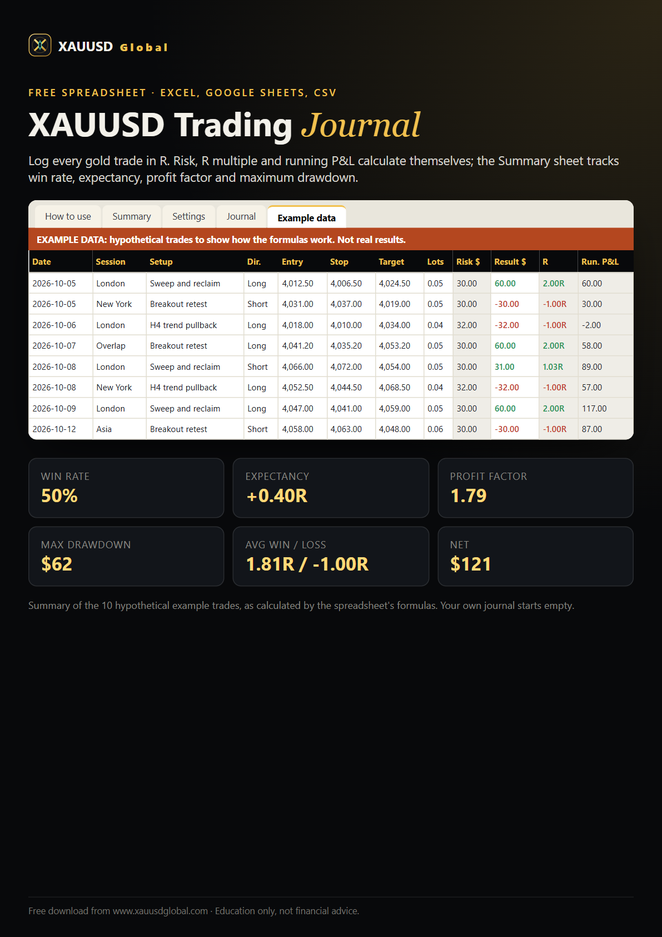
This free XAUUSD trading journal is an Excel spreadsheet that also opens in Google Sheets and LibreOffice, plus a plain CSV version; download either without signing up. Each row is one gold trade: date, session, setup, direction, entry, stop, target, lots, risk in dollars (1R), result, R multiple, running P&L, a screenshot link, notes and emotions. Formulas work out your risk from the stop and contract size, your R multiple and running P&L, and a Summary sheet shows win rate, average win and loss, expectancy, profit factor, maximum drawdown and results by session. A separate sheet of clearly marked hypothetical trades shows the formulas working.
What's inside
- How to use. Six steps to set it up and the definitions of 1R, R multiple, expectancy, profit factor and drawdown.
- Summary. Trades, wins, losses, win rate, net P&L and net R, average win and loss in R, expectancy in R and dollars, profit factor, maximum drawdown in dollars and as a percentage, and results by session.
- Settings. Your contract size (most accounts use 100 oz per lot; check yours) and starting balance, and the drop-down lists for sessions and emotions.
- Journal. 500 empty rows with the 15 columns, drop-downs for session, direction and emotion, and formulas in the grey columns.
- Example data. Ten hypothetical XAUUSD trades, labelled as examples, so you can see every formula and the summary working before you add your own.
- CSV version. The same 15 column headers as a plain .csv file, for Numbers, Notion, a database or any other tool. It has no formulas.
How to use it
- Open the .xlsx in Excel, or upload it to Google Drive and open it with Google Sheets. Set your contract size and starting balance on the Settings sheet.
- Before each trade, fill in date to lots. The risk in dollars (1R) appears by itself; check that it matches your plan.
- When the trade closes, enter the result in dollars after spread, commission and swap. The R multiple and running P&L update.
- Add a screenshot link and one honest line about what happened and how you felt.
- Every weekend, read the Summary: expectancy, profit factor, drawdown and results by session. Compare with the expectancy calculator to see what your numbers imply.
Related lessons, tools and courses
The trading journal spreadsheet summarises free material on this site. These pages go deeper:
- How to keep a trading journal
- Gold trading journal templates: what to record and review
- Expectancy calculator
- Trading math and expectancy lesson
- Drawdown recovery calculator
- Free gold risk management course
More free files: candlestick patterns cheat sheet, chart patterns cheat sheet, trading plan template, pre-trade checklist, and the gold trading starter kit. See them all on the free downloads page.
Frequently asked questions
Is the trading journal spreadsheet free?
Yes. The Excel file and the CSV are free downloads with no sign-up, email or payment.
Does the journal work in Google Sheets?
Yes. Upload the .xlsx to Google Drive and open it with Google Sheets; the formulas, drop-downs and summary carry over. It also works in LibreOffice Calc and Apple Numbers.
What is an R multiple?
Your result divided by the amount you risked. If you risked $40 and made $80, that trade was +2R; a full stop-loss is −1R. Measuring in R lets you compare trades of different sizes and see whether your setups pay for their losses.
How does the spreadsheet calculate risk?
Risk in dollars (1R) = the distance from entry to stop × lots × contract size. The contract size comes from the Settings sheet; most accounts use 100 oz per standard lot, but check your account’s specification.
What is the Example data sheet?
Ten hypothetical gold trades, clearly labelled, that show how every formula and the summary work. They are not real results. Your own trades go in the Journal sheet, which starts empty.
How many trades do I need before the numbers mean anything?
A handful of trades proves very little. Many traders look for dozens of trades taken exactly by their rules before judging a setup, and more for a reliable estimate of expectancy and drawdown.
Educational content only, not financial advice. Trading gold with leverage carries a high risk of loss.